Find emails you haven't replied to in Gmail
Checked November 11, 2026
Gmail has no search that finds emails you haven't answered. You can get close three ways: turn on Gmail's Nudges, search your inbox for mail not from you, or use a tool that checks who sent the newest email in each conversation. Orbit is a free tool that does the last one and lists everyone waiting on you, longest wait first.
1. Turn on Gmail's Nudges
In Gmail, open Settings (the gear), then See all settings, then the General tab. Next to Nudges, tick "Suggest emails to reply to" and save. Gmail then shows emails you may have forgotten to answer at the top of your inbox. Google notes that conversation view needs to be on.
What it misses: Google doesn't say how Gmail picks which emails to nudge, and there's no separate list of them.
2. Search for mail that isn't from you
Type this into the Gmail search box:
-from:me newer_than:14d
It shows conversations from the last 14 days with at least one email from someone other than you. Add category:primary to skip promotions, or swap in is:unread to see only what you haven't opened.
What it misses: Google's own search help warns that conversations with excluded criteria may still appear, so a conversation you already answered still shows up, because their earlier email matches. Results are newest first, so the people who have waited longest end up at the bottom. And is:unread skips everything you opened and meant to answer later.
3. Use a tool that checks the newest email
The reliable test is simple: in each conversation, is the newest email from them? If it is, they're waiting on you. A tool that reads your mail can check every conversation that way and list only those.
The three ways side by side
| Nudges | Search | Orbit | |
|---|---|---|---|
| Finds emails you opened but didn't answer | Gmail decides | Yes | Yes |
| Leaves out conversations you already answered | Yes | No | Yes |
| One list, longest wait first | No | No, newest first | Yes |
| Leaves out newsletters and no-reply mail | Gmail decides | Only with filters | Yes |
| Reply ready to send | No | No | Yes, you check it and press Send |
| Price | Free, built into Gmail | Free | Free. Orbit AI is $12 a month |
How Orbit decides who's waiting
Orbit reads your Gmail and marks someone as waiting when their email is the newest in the conversation. It leaves out newsletters and bulk mail, no-reply addresses, people you've never written to, and anyone you choose to ignore. The list shows how long each person has waited, longest first, with a reply already drafted. You check it, press Send, and have a few seconds to undo.
Tap a person to see your past emails with them, newest first: every email either of you wrote, read, archived or sent, the way Gmail's conversation view shows it. Search finds anyone you email, including people who aren't waiting on you.
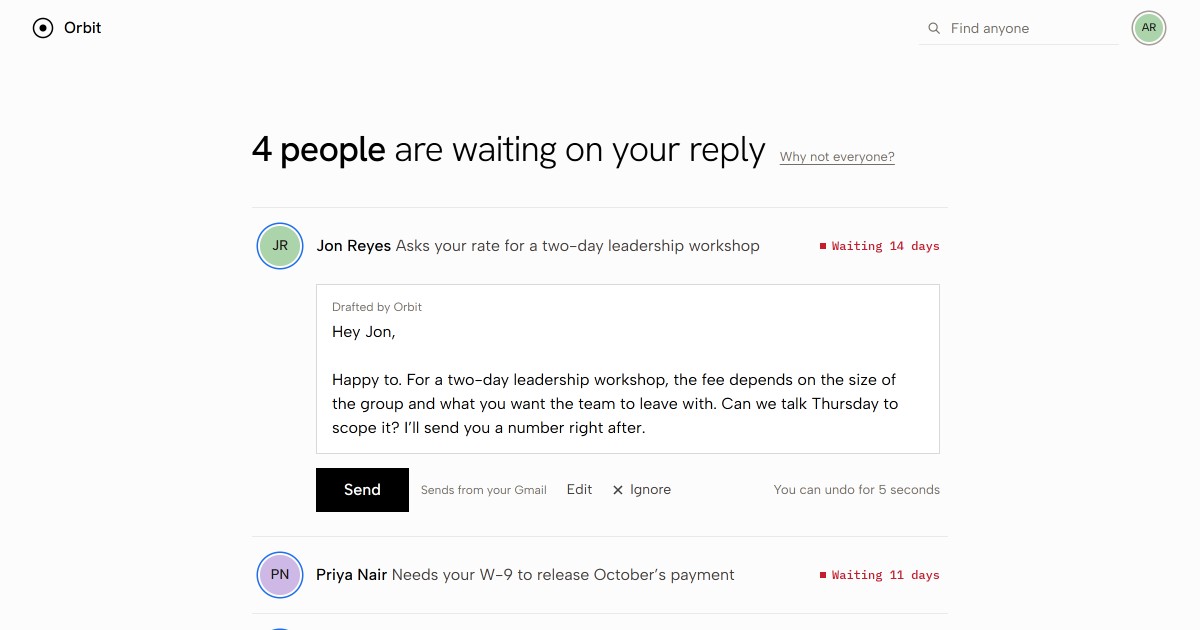
Orbit also puts an Orbit/Waiting label on those emails in Gmail, so you can see the same list there. It works with Gmail and Google Workspace, connects with a Google app password rather than your Google password, and never sends anything on its own. Orbit is free. Orbit AI, free for 7 days and then $12 a month or $96 a year, writes replies in your own words.
How this page was made
Written by Westward, who make Orbit, from Google's Gmail Help pages on replying and on search operators, checked on November 11, 2026. See how Orbit handles your mail on the privacy page.